
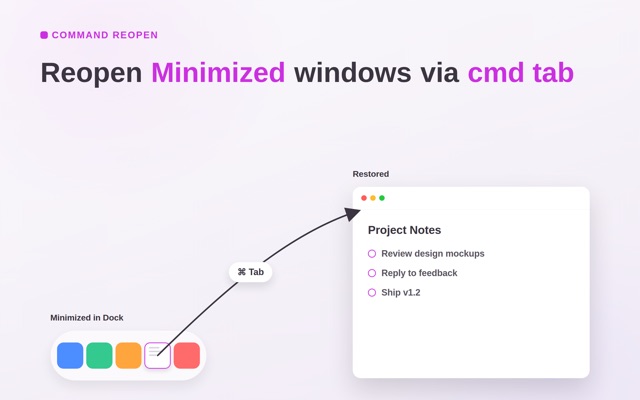

Bring minimized windows back automatically when you press Cmd+Tab.
Command Reopen fixes one irritating macOS behavior: you switch to an app with Cmd+Tab, the app activates, but its minimized window stays hidden in the Dock — or nothing appears because the last window was closed.
Keep your native workflow: It preserves the native macOS app switcher. It does not replace Cmd+Tab with a launcher, window manager, or custom switcher. Keep the muscle memory you already rely on.
What it fixes: • An app activates on Cmd+Tab, but its minimized window stays hidden in the Dock • You closed an app's last window and Cmd+Tab switches back to an empty screen
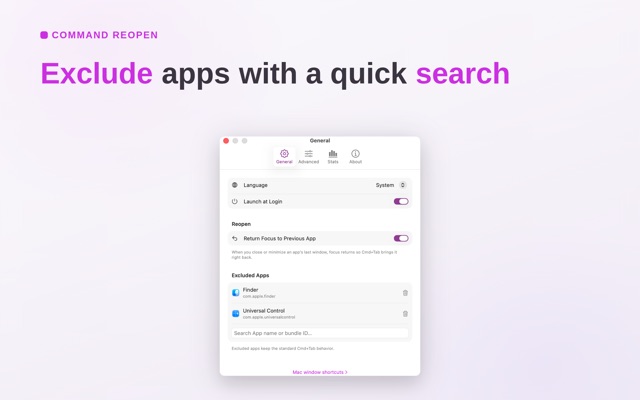
Built-in controls: • Exclude apps you prefer to manage manually • Lightweight menu bar utility with ultra-low resource usage
Zero permissions: • No Accessibility permission required • No Screen Recording permission required • 100% private, runs locally with no tracking
Source code available on GitHub.
Terms of Use: https://www.apple.com/legal/internet-services/itunes/dev/stdeula/
- Updated
- Listed here
- App Store ID
Built this? Put a badge on your site
<a href="https://indie-apps.com/apps/command-reopen-fix-cmd-tab-333924"><img src="https://indie-apps.com/badge/command-reopen-fix-cmd-tab-333924" alt="Listed on Indie Apps" width="150" height="56"></a>

