



More memories. More room on your Mac.
Storage fills up quietly: camera folders, old downloads, pictures scattered across years of files. KarmaDisk takes you from “where do I start?” to clear choices about what to keep, organize or make smaller, and nothing changes until you approve it.
FIND YOUR PHOTOS. GIVE THEM A HOME. Choose your home folder or any location you want to search. KarmaDisk groups the pictures it finds and suggests album names from their folders. Preview each group, rename it and import it into Apple Photos, optionally making supported images smaller first without changing a pixel. Once the imported copies are verified, you can approve moving the originals to Trash, or keep them.
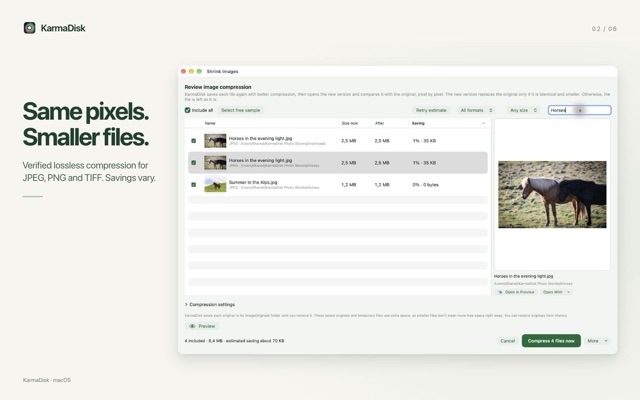
SMALLER FILES. THE SAME PIXELS. Make supported JPEG, PNG and TIFF files smaller without changing a single pixel. KarmaDisk verifies every result before using it and keeps your originals for recovery until you choose to remove them. For JPEGs, you can also choose JPEG XL: each conversion is accepted only after it is reconstructed and matches the original JPEG byte for byte. Some apps and websites can’t open JPEG XL yet, so keep JPEG where compatibility matters.
A LIGHTER PHOTOS LIBRARY. Review unedited JPEG, PNG and TIFF photos already in Apple Photos and create verified, smaller copies. Dates, locations, favorites and regular album membership are carried over and checked. Your originals stay until you approve removing them. HEIC (the iPhone default), RAW, Live Photos, edited photos and videos are left untouched. Some Photos-only details, such as captions, keywords and People, may not transfer, so read the in-app explanation and start with a few photos.
SEE WHERE YOUR SPACE GOES. Explore the folders you choose as a colorful circular map or a treemap. Click into folders, sort the largest files and compare identical copies, keeping as many as you need. Guided cleanup helps you review old downloads and installers without selecting anything automatically.
GET STARTED FREE. MAKE ROOM FOR MORE. Download KarmaDisk and explore your storage with free scanning, interactive maps, duplicate finding and guided cleanup. Try the photo tools, then unlock unlimited photo processing and automatic file organization with one optional Full Version purchase. No subscription. If you bought an earlier paid version of KarmaDisk, Full Version is already yours.
YOUR FILES. YOUR DECISION. KarmaDisk runs in Apple’s App Sandbox and accesses the folders you choose and, with your permission, your Photos library. You approve every change. Analysis runs on your Mac. No KarmaDisk account, no ads, no tracking. Cleaning up originals and restoring saved originals never requires a purchase.
Good to know • Savings vary, and some images can’t be made smaller losslessly. • New copies and saved originals need extra space for a while. Files in Trash use space until you empty it. • Imports and Photos optimization use your System Photo Library. With iCloud Photos, additions and removals may sync to your other devices, cloud originals may need downloading, and Recently Deleted can delay space savings (up to 30 days). • KarmaDisk finds existing files; it can’t recover deleted photos. Protected system data, other apps’ private data and Photos library packages are not scanned. • The App Store edition doesn’t uninstall apps or clean other apps’ private data. Requires macOS 15 or later.
- Updated
- Listed here
- App Store ID
Built this? Put a badge on your site
<a href="https://indie-apps.com/apps/karmadisk-photos-storage-219976"><img src="https://indie-apps.com/badge/karmadisk-photos-storage-219976" alt="Listed on Indie Apps" width="150" height="56"></a>

