


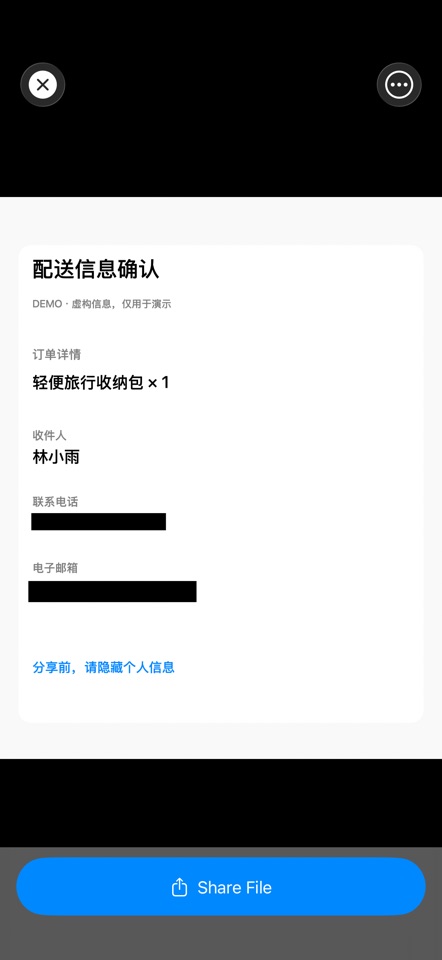
Redact photos, videos and PDFs before you share them. Hide sensitive details, review your edits and export a copy on your iPhone or iPad. Content processing stays on your device.
FOR SCREENSHOTS, RECEIPTS & PHOTOS Use local text detection to find phone numbers and email addresses, then review the suggested areas. Search repeated text or add covers manually. Choose solid covers, mosaic or blur, and review detected faces before covering them.
FOR VIDEO PRIVACY Review detected faces or place your own cover over a selected area. Tap to position the box, adjust its size and choose when it appears. Manual boxes stay in a fixed position; preview the full video to check that moving details stay covered.
FOR PDF DOCUMENTS Search for sensitive text in a contract, receipt or other document. Review matching areas page by page and add manual covers where needed. Text beneath redacted areas is removed from the exported PDF. Check the entire exported copy before sending it.
PICK UP WHERE YOU LEFT OFF Save encrypted drafts for photos, PDFs and videos. For multiple images, apply shared detection rules, review each file, and pause or retry as needed. Organize originals and finished copies into groups, combine images into a long image, and share from the result preview.
YOUR FILES, ON YOUR DEVICE Imported originals and editing drafts are stored encrypted on your device. Optional app locking supports a password and Face ID or Touch ID on compatible devices. No account is required to process your files. Purchases and restoring purchases use Apple services.
TRY FREE. UPGRADE WITH ONE PURCHASE. The free version includes 3 image/video exports combined and 3 PDF exports per day. Free video exports support source files up to 300 MB. A one-time in-app purchase removes these limits and unlocks premium stickers. No subscription.
Automatic detection can miss private information. Review the entire exported result before sharing.
- Updated
- Listed here
- App Store ID
Built this? Put a badge on your site
<a href="https://indie-apps.com/apps/zeronet-redact-blur-censor-290503"><img src="https://indie-apps.com/badge/zeronet-redact-blur-censor-290503" alt="Listed on Indie Apps" width="150" height="56"></a>

