




Refresh finds what is filling your Mac and identifies what is safe to delete before you delete anything, with daily scheduled jobs.
KEY FEATURES • Measures everything before deleting anything • Designed for touch on the new MacBook Pro • Four safety levels decide what's cleaned • Finds caches, logs and Xcode data • Large files, duplicates and duplicate pictures • Moves your own data to backup • Scheduled cleaning of safe items only • Tells you when a restart frees space • Available in English • No account, no tracking
WHO IT HELPS • Anyone whose Mac says the disk is full — and who doesn't know what is safe to delete. Refresh shows what each item is and what cleaning it would cost. • Developers — Xcode Derived Data, iOS Device Support, SwiftUI Previews and package caches that grow without asking. Refresh finds them and says which ones rebuild themselves. • Photographers and video makers — the same picture saved twice at different sizes, and large files forgotten in Movies and Downloads. Refresh finds the copies and keeps the best one. • Anyone who wants to look before they clean — your own files are never swept up in a bulk clean, and nothing goes without your say.
THE FEATURES IN BRIEF MEASURES FIRST — Every category is measured on your own Mac and sorted into four levels. Safe to Remove; Review before deleting; Move to Backup; Protected;
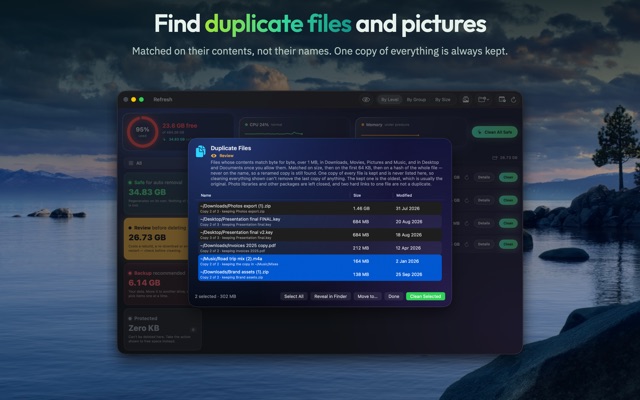
FINDS — App and browser caches, logs and crash reports, Xcode build data, package caches, large files, and duplicate files matched on their contents, so a renamed copy is still found. One copy of everything is always kept.
YOU CHOOSE THE FOLDERS — Mac App Store apps can only look in folders you allow. Refresh suggests the ones worth scanning, says what each is for, and remembers your answer.
SORT IT YOUR WAY — Drag a category from one level to another, or add your own folders to any level.
MOVE, DON'T LOSE — Copy your own data to another drive, then free the space on this Mac.
KEEPS ITSELF CLEAN — Clean caches and logs daily, weekly or monthly, or whenever free space runs low. Only things that rebuild themselves are ever cleaned automatically, and never while the app that uses them is open.
WHEN A RESTART HELPS — macOS deletes its swap files every time it starts up. When they take a gigabyte or more, Refresh says so.
DESIGNED FOR TOUCH — On the new touchscreen MacBook Pro, everything works with a finger as well as a pointer: a ⋯ button on every row for what right-clicking offers, room for a fingertip around small buttons, and tick boxes to pick several items without ⌘.
AT A GLANCE — The menu bar shows how full your disk is, and cleans the safe categories in one click.
LIMITS — It cannot see macOS's own System Data, other apps' containers or anything that needs an administrator password. Mac App Store apps are not allowed to, and it would rather say so than pretend.
PRICING Every file, cleaning and moving need either the Refresh Yearly subscription or the Refresh One-Time purchase. • Yearly: renews every year at the price shown in the App Store, charged to your Apple Account, unless you cancel at least 24 hours before the end of the current period. Manage or cancel it in App Store → your account → Subscriptions. • One-Time: pay once at the price shown in the App Store, and everything stays unlocked for good. Nothing renews.
PRIVACY • No account, no tracking. Nothing leaves your Mac unless you choose to send feedback. • Files from Review and Move to Backup go to the Trash, so you can put them back. • Nothing is removed until you confirm it.
LINKS Terms of Use: https://www.apple.com/legal/internet-services/itunes/dev/stdeula/ Privacy Policy: https://refreshyourmac.com/app-store/privacy/ Support: https://refreshyourmac.com/app-store/support/
- Updated
- Listed here
- App Store ID
Built this? Put a badge on your site
<a href="https://indie-apps.com/apps/refresh-storage-cleaner-530620"><img src="https://indie-apps.com/badge/refresh-storage-cleaner-530620" alt="Listed on Indie Apps" width="150" height="56"></a>

